Remapping Terminal Copy Paste (including VS Code)
May 24, 2023
I’ve been meaning to write something and as I’ve used this blog as documentation for my computer setup before I decided I could use this as an opportunity to make a post while fixing a minor annoyance I was experiencing.
Ctrl-C vs Ctrl-Shift-C for copying
Historically Ctrl-C was used to interrupt a process using [SIGINT] and I guess after that somebody decided to standardize on Ctrl-C for copy, Ctrl-X for cut and Ctrl-V for paste whoever makes these decisions decided they weren’t going to change. Instead every terminal seems makes you do Ctrl-Shift-C for copy and Ctrl-Shift-V for paste.
I’m used to Ctrl-C in everything that isn’t the terminal and on OS-X the copy command just works everywhere so on Linux machines I remap Ctrl-C to copy and remap SIGINT to Ctrl-Shift-C if I have to.
Remapping copy
GNOME terminal
I use GNOME terminal since that’s the OS default. Changing the hotkey for copy and paste is easy to find in ‘Preferences > Shortcut tab’:
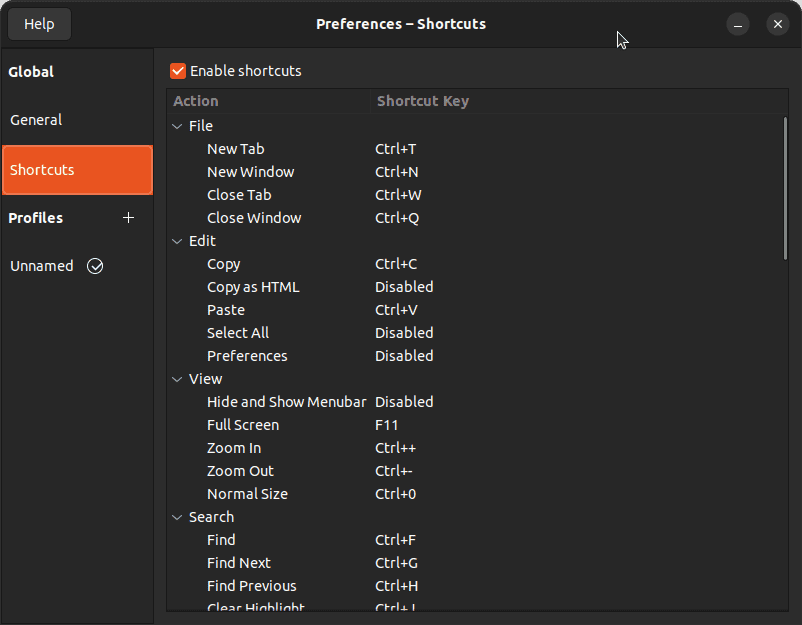
Updating copy to be Ctrl-C automatically makes Ctrl-Shift-C send SIGINT so nothing more to do here.
VS Code
Doing the above doesn’t fix the terminal in VS Code which I use a lot with my projects so I had to fix it there too. There I had to:
- Go to ‘Preferences > Keyboard Shortcuts’
- Set the ‘Terminal: Copy Selection’ keybindings to
Ctrl-C - Set the ‘Terminal: Paste into Active Terminal’ keybinding to
Ctrl-V
And that seemed to be that. When there is a selection Ctrl-C will copy without sending SIGINT and if there is no selection VS Code sends a SIGINT.